
Layout
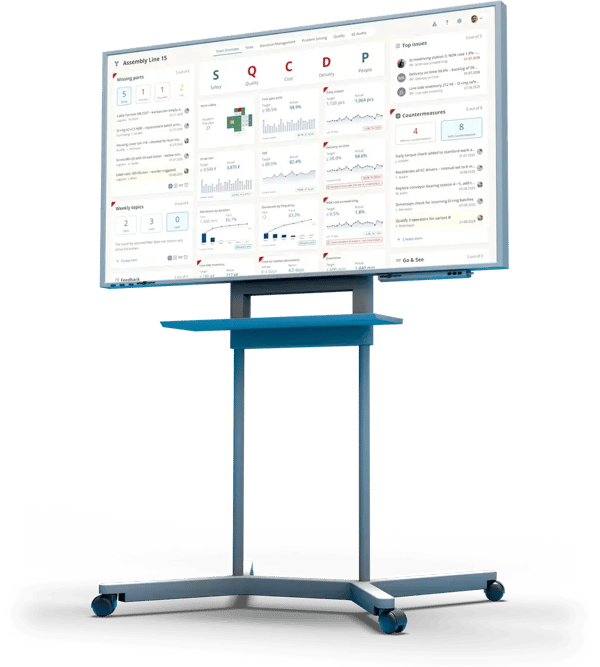
KPIs by SQCDP, plus top issues, countermeasures and the team's lists
Cascade
Line, department, plant: all team boards connected, with the cascade navigator
Screen
In the browser, no installation: on the large screen at the line, on tablets and laptops
In short
What is a shop floor board?
A shop floor board is the board where a team meets every day. It shows the team's KPIs, current deviations and open countermeasures. Digital means the values come in automatically, every countermeasure has an owner, and the next level sees the same board.
The boards are connected through the cascade: line, department, area, plant. Whatever one level cannot solve on its own goes one level up and comes back with a decision.
How a shop floor board is built
KPIs by SQCDP
Safety, quality, cost, delivery, people: each tile with target, actual and trend, red when off target.
Top issues
The three most important issues of the week, each linked to the KPI it is about.
Countermeasures
What already has a countermeasure and what does not, with owner and due date.
Team lists
Missing parts, weekly topics, feedback, Go & See, shift handover: from templates or set up freely.
The loop from KPI to countermeasure runs at the team board.
- 1 · KPITarget missed?KPIs land on the board automatically and show where things go wrong.
- 2 · DeviationWhat happened?Capture it where it happens. The Pareto shows what to tackle first.
- 3 · Root causeWhy?PDCA for clear cases, A3 with Ishikawa for the tough ones.
- 4 · CountermeasureWho does what by when?Tasks and T-Cards with an owner and a due date.
↺ Back to 1: the KPI shows whether the countermeasure worked
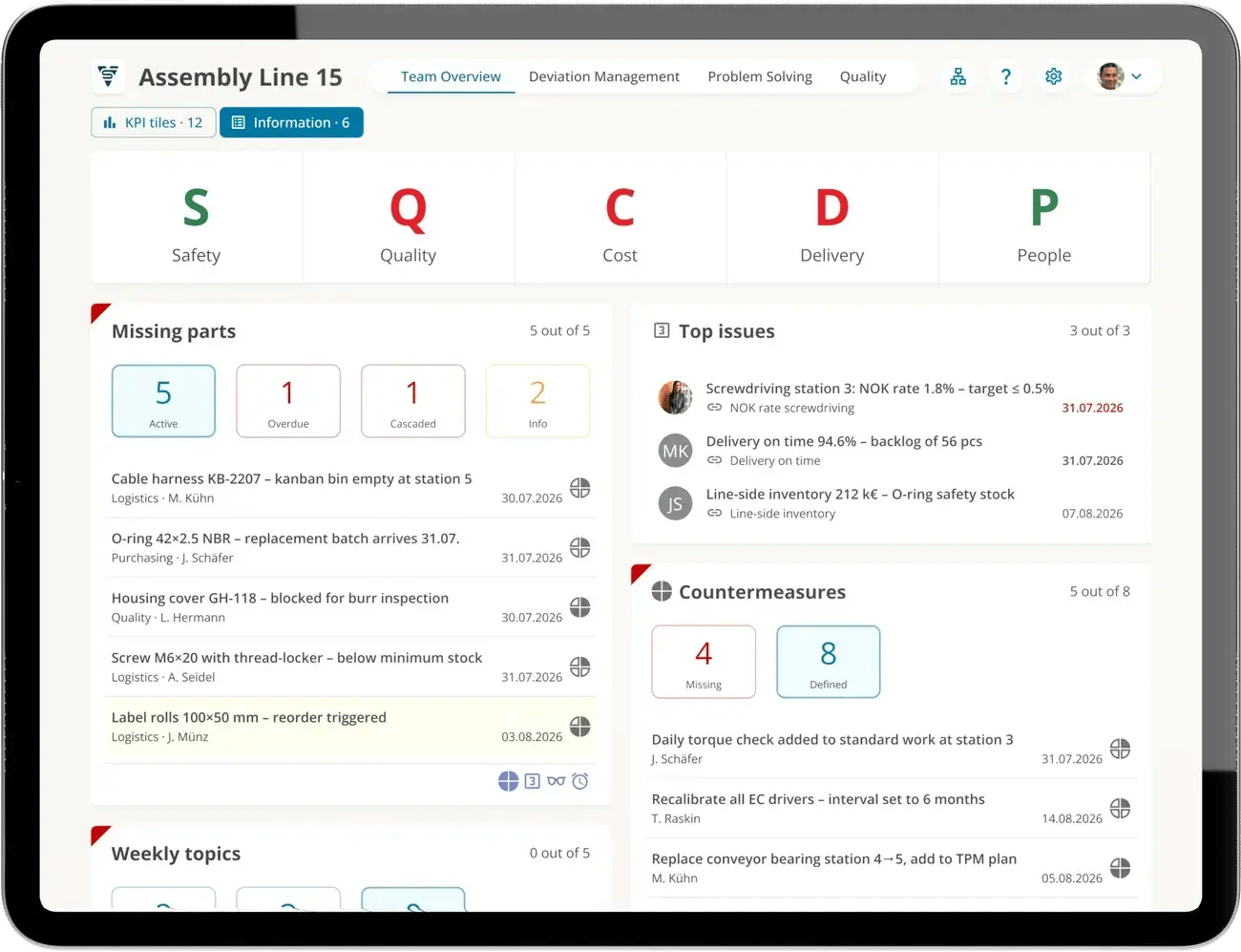
Team board of assembly line 15, information view: the lists for the daily meeting
Design
Everything for the meeting on one board
Next to the KPI tiles, every team board has a second view with the team's lists: missing parts, weekly topics, top issues, countermeasures, feedback and Go & See. The meeting switches between the two, and the board stays the same.
- Lists from templates or the list editor: shift handover, inventory lists, shop floor reports
- Status at a glance: active, overdue, cascaded
- Every entry with an owner and a due date
Cascade
From the line to plant management
The cascade navigator shows the plant as a tree: operations, production, foundry, pre-fabrication, assembly and the lines below, each with the number of KPIs off target. One click opens that unit's board.
- KPIs roll up along the cascade
- Issues go one level up and come back with a decision
- Search by team, board or code, plus favorites and recently visited
Which line is driving the plant KPI?
The drill-down shows it, starting from the KPI. Go to KPI management
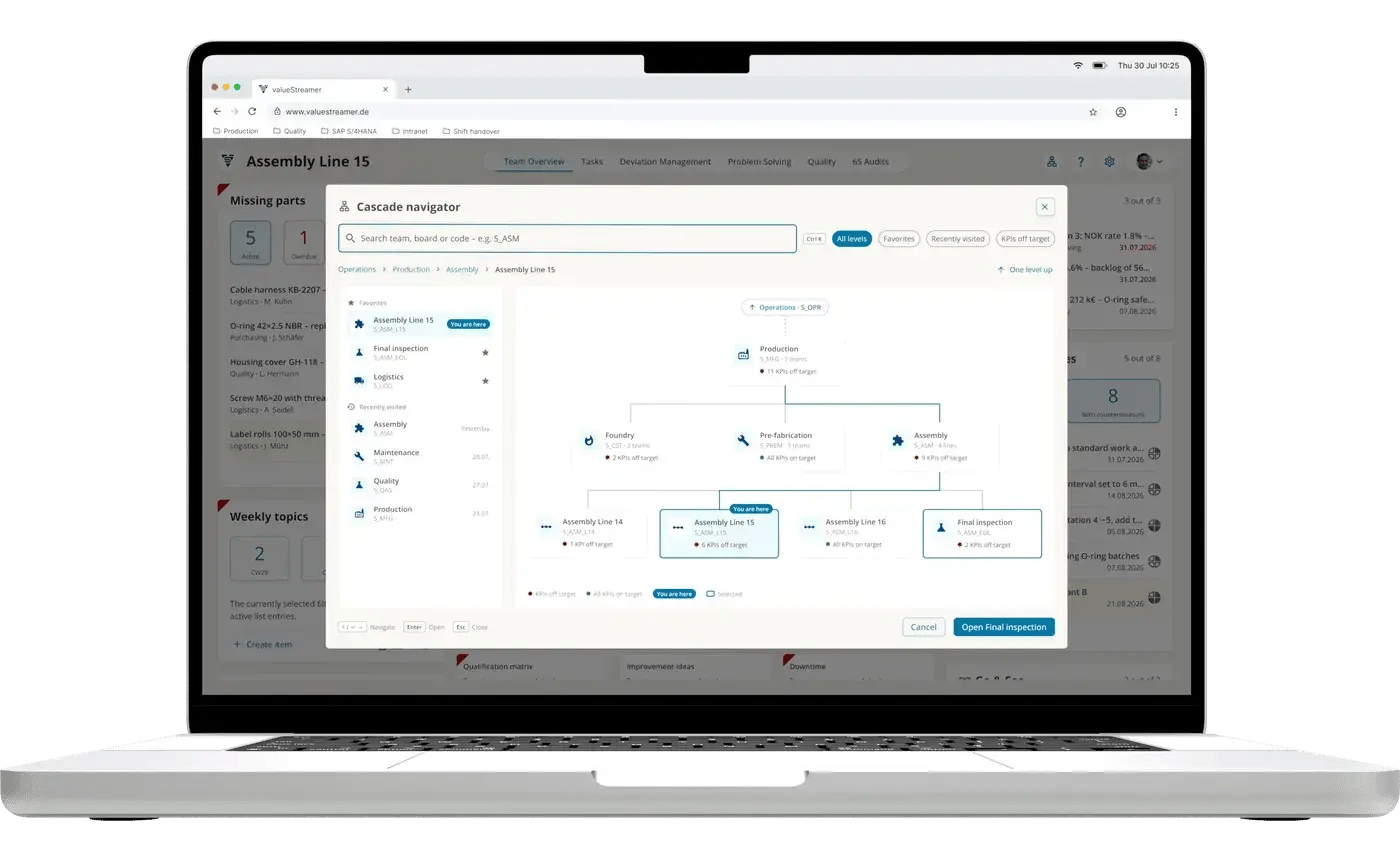
Cascade navigator: from assembly line 15 up to operations
Board types
One standard, four boards
KPIs, lists, permissions and teams are configured centrally. So every site and area works to the same standard and stays comparable.
Team board
The SQCDP board for the daily meeting where the value is created: KPIs, issues, countermeasures.
My homepage
Every person sees their open tasks, countermeasures and process steps from all teams in one place.
Task board
Tasks and T-Cards in kanban style, with owner and due date. Task management
Process board
Projects and processes across teams, with phases and progress. Process management
From lean practice
One board every level understands
ValueStreamer grew out of lean consulting (formerly STAUFEN.AG). The layout, cascade and standard of the boards come from shop floor management practice in many plants. Values come in via REST API from systems such as SAP, Forcam or MPDV.
- In the browser, no installation
- REST API
- Email and Microsoft Teams
- Hosted in the EU
- ISO/IEC 27001:2022 certified
117,000+
deviations closed
53,000+
countermeasures completed
4,900+
teams work with ValueStreamer
4 weeks
from kickoff to go-live
Totals as of October 2026.
FAQ
Frequently asked questions
The board where a team meets every day for its shop floor meeting, also written shopfloor board. It shows the team's KPIs, current deviations and open countermeasures. The board is the central leadership tool in shop floor management and is connected to the boards of the levels above through the cascade.
Usually in four areas: KPIs, often grouped by SQCDP (safety, quality, cost, delivery, people), the most important issues of the week, open countermeasures with owner and due date, and the team's lists such as missing parts, shift handover or Go & See.
With a few KPIs the team can influence itself, fixed areas in fixed places, and a standard that applies to every team. The board should be up to date before the meeting so the meeting is done in 10 to 15 minutes. Digitally, templates and automatic values take over much of this work.
In ValueStreamer, KPIs and lists are set up once as templates and then added to the teams. That way, every team board is built from the same standard, and line, department and plant calculate with the same definitions. You create lists such as missing parts, shift handover or inventory lists with the list editor.
Values come in automatically instead of being copied by hand, every countermeasure has an owner and a due date, and the next level sees the same board without asking. The history is kept, and teams can even meet at the same board across sites.
The link between shop floor meetings across levels: first the team meets at the line, then the department, then the area or plant. Whatever one level cannot solve goes up, and decisions come back down. In ValueStreamer, the cascade navigator shows this structure and opens any unit's board with one click.
Nothing special. ValueStreamer runs in the browser without installation: on the large screen at the line, on tablets or laptops. During implementation, we advise on which screens and locations fit your meetings.
ValueStreamer sends notifications by email and in Microsoft Teams. That way, owners hear about new issues and countermeasures even when they are not standing at the board.
A board that shows work in columns by status, such as open, in progress and done. Cards move from left to right, which makes bottlenecks and overload visible. In ValueStreamer, the task board and the process board work on this principle.
See your cascade on the board
A 30-minute demo built around your questions: from the team board at the line through the cascade to plant management.