
.
🔍 Content
-
Why is this topic important?
-
Public vs. Private Teams
-
Roles & Permissions
-
Deviations & Measures
-
FAQ
💬 Why is this topic important?
ValueStreamer uses clearly defined terms for roles, functions, and structures. A shared understanding is essential for efficient cross-team collaboration and correct use of features.
🔓 Public vs. Private Teams
Public Teams
-
By default, all teams are public
-
All users have read access
-
For cascaded tasks or measures:
👉 The creator team retains edit rights, even in the target team
📸 Screenshot: Public team in the cascade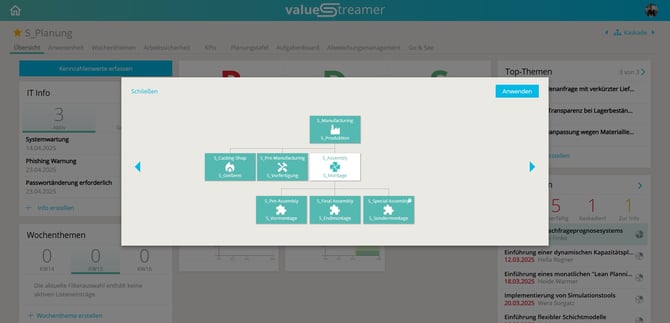
Private Teams
-
Only team members have access
-
Recognizable in the cascade by a closed icon
-
No access for non-members, not even read access
📸 Screenshot: Symbol for private team in the cascade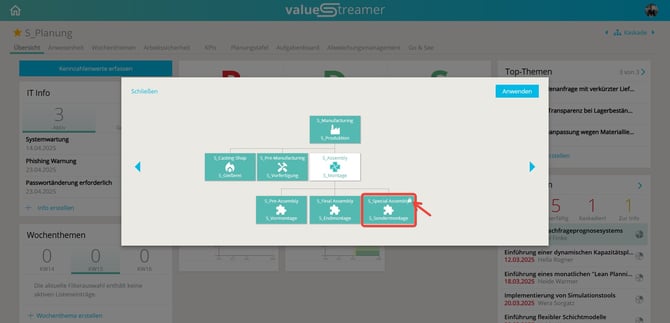
⚠️ Warning: Content from private teams is not visible or searchable to outsiders.
👥 Roles & Permissions
System-wide Roles
| Role | Rights & Functions |
|---|---|
| 🛡️ System Administrator | Full access. Can manage users, teams, KPIs, and lists |
| 👤 User | Read access in public teams, write access in assigned teams |
| 🌐 External | Limited access, no read rights to other teams |
ℹ️ Info: Only system administrators can create or delete users or reset passwords.
Team-level Roles
| Role | Rights & Details |
|---|---|
| 🛠️ Team Administrator | Same as team member, plus: manage tabs, configure boards |
| 👤 Team Member | Write access in the team, read access in public teams |
| 👀 Guest | Not visible in attendance list, task board, or process board; same write access as team members |
📌 Write rights only apply in teams where you are a member
📌 Read rights only apply for public teams
❗ Deviations & Measures
🟥 Deviation
-
Describes why a goal (KPI, task, process) was not achieved.
-
Key question: What happened?
📸 Screenshot: Create deviation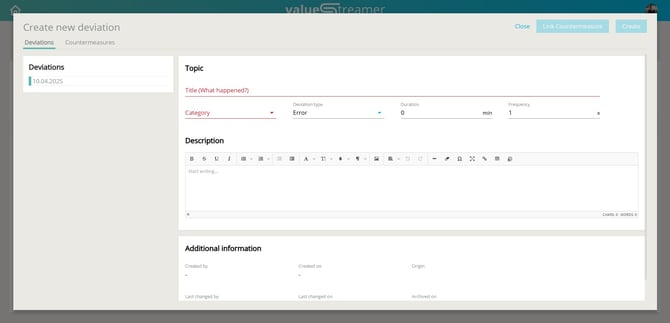
🛠️ Measure
-
Unplanned activities to correct deviations.
-
Key question: How do we get from the current to the target state?
Two types of measures:
-
🔧 Error correction measure – cause is known
-
🔍 Problem-solving measure – cause needs to be determined
📸 Screenshot: Measure in the measure sheet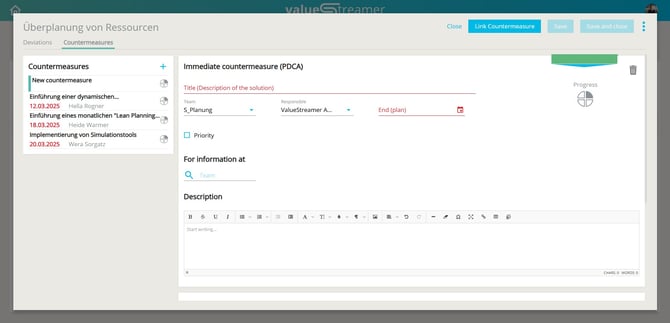
❓ FAQ
What’s the difference between a User and a Team Member?
→ A team member has write rights in the assigned team; a regular user does not necessarily.
Can I see which teams are private?
→ Yes, in the cascade as a symbol – but without access to content.
Why do I see content from other teams?
→ The team is either public, or the content has been cascaded to you.