
🔍 Contents
-
What does process confirmation mean on the shopfloor?
-
Why T‑Cards are suitable for leadership routines
-
Typical use cases for T‑Cards
-
T‑Card logic: Plan, Do, Confirm
-
Deviations as part of process confirmation
-
Transparency for leaders
-
Tips for sustainable use
-
FAQ
▶️ What Does Process Confirmation Mean on the Shopfloor?
Process confirmation means that defined standards are regularly reviewed and actively confirmed — not just documented, but actually performed.
Typical examples:
-
Safety walks
-
5S audits
-
Quality inspections
-
Shift handovers
-
Standard workstation checks
The goal is not control, but ensuring that standards are effective.
✨ Tip: Without regular confirmation, standards quickly turn into “paper processes”.
🎯 Why T‑Cards Are Suitable for Leadership Routines
T‑Card tasks are specifically designed for recurring process checks:
-
fixed cadence (daily / weekly / monthly)
-
clear responsibilities
-
simple confirmation directly in the board
-
automatic re‑creation after confirmation
This way, T‑Cards digitally replicate the logic of classic shopfloor boards.
📸 Screenshot: T‑Card tasks in the task board with red/green status logic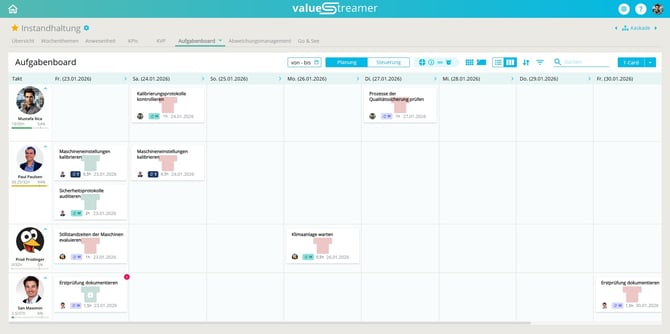
🧩 Typical Use Cases for T‑Cards
Use T‑Cards especially for:
-
🔍 Gemba walks / shopfloor walks
-
🦺 Safety inspections
-
🧹 5S checks
-
📋 Process and quality audits
-
👥 Leadership routines at area or department level
✨ Tip: The higher the leadership level, the longer the recurrence cycle should be (e.g., weekly or monthly).
🔁 T‑Card Logic: Plan → Do → Confirm
The T‑Card process follows a clear sequence:
Plan
The T‑Card is created with a due date and recurrence pattern.
Do
The task is carried out during the planned period.
Confirm
Execution is actively confirmed — not automatically.
Re‑create
The next T‑Card is automatically scheduled.
📸 Screenshot: T‑Card confirmation dialog with automatic re‑creation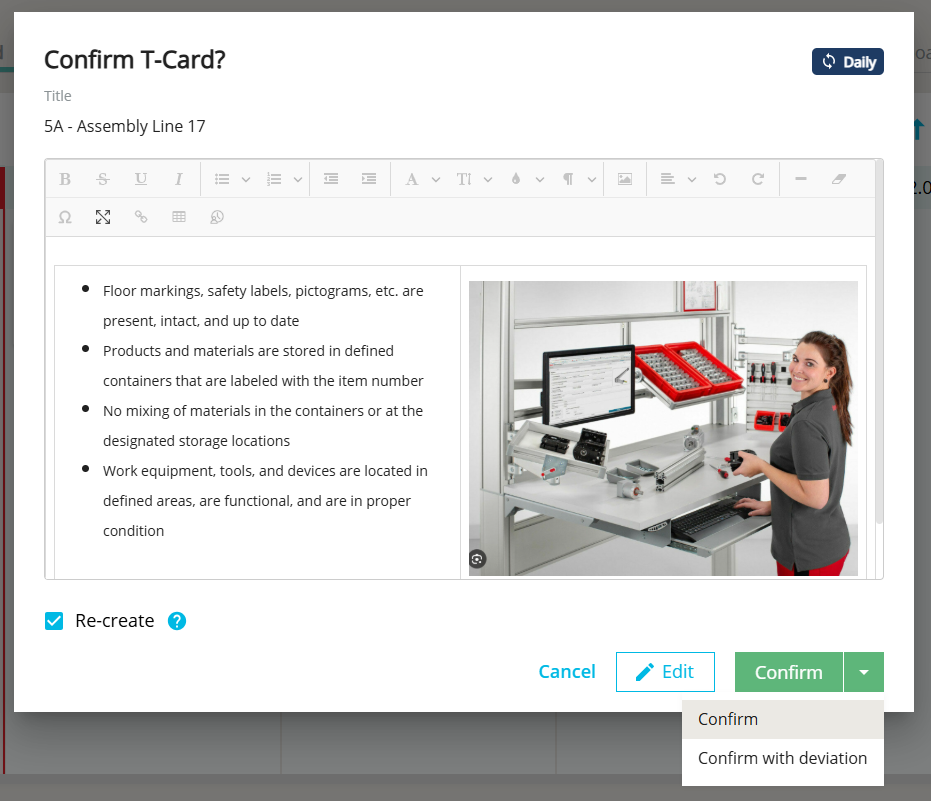
⚠️ Important:
Without confirmation, the process is considered not performed, even if the task was actually completed.
🟢 Deviations as Part of Process Confirmation
When confirming a T‑Card, two options are available:
-
✅ Confirm → Process was followed without deviation
-
🌀 Confirm with deviation → Process performed, but with issues
When selecting Confirm with deviation:
-
the T‑Card is marked as completed
-
it additionally receives a PDCA symbol on the card
-
a deviation can be documented immediately
📸 Screenshot: T‑Card with green background and PDCA symbol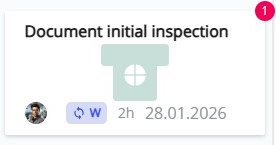
ℹ️ Note: The PDCA symbol indicates that the check was done, but the standard was not fully met.
✨ Tip: This clearly separates “not done” from “done, but not to standard”.
👀 Transparency for Leaders
The T‑Card Board makes the following visible:
-
Which routines were completed?
-
Where do recurring deviations occur?
-
Which areas are stable and which are not?
Additional support is provided by:
-
🔴 Overdue columns for unfinished tasks
-
filters for T‑Card tasks
-
visibility in A3 reports and team boards
📸 Screenshot: Overdue column with open T‑Cards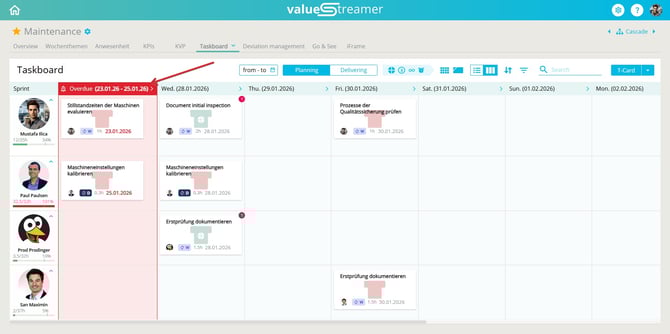
✨ Tip: Use T‑Cards to evaluate processes — not to evaluate people.
✨ Tips & Best Practices
-
Start with only a few, clearly defined routines.
-
Consistently link T‑Cards to deviations when standards are not met.
-
Use fixed time slots for leadership routines (e.g., every Monday at 8:00 a.m.).
-
Explicitly train leaders on the difference between control and process confirmation.
-
Regularly review whether T‑Cards provide real value or are just being “checked off”.
❓ FAQ
What is the difference between regular tasks and T‑Cards?
Regular tasks are one‑time activities.
T‑Cards are intended for recurring process confirmations and are automatically rescheduled after each confirmation.
Does every T‑Card need to be linked to a deviation?
No. Only if the process did not follow the standard. In that case, Confirm with deviation should be used to make causes visible.
What does an overdue column mean in the context of process confirmation?
It shows that routines were not carried out as planned. This is an important leadership signal, not just a planning issue.