
🔍 Inhalt:
- Kiosk-Mode
- Multiple links to key metrics from different teams
- Optimized integration of external content (iFrame)
- More realistic T-card planning
- Improved search on the home page
- Mobile Landingpage
- Bug Fixes
- Outlook: Deprecation of Lists API v1 and Deviation API v2
🖥️ Kiosk-Mode
Outside of shopfloor meetings, digital boards should display only relevant core information — without navigation options and without editing capabilities. The new kiosk mode delivers exactly that: a secure display view for shopfloor boards, reduced to the essentials.
📸 Screenshot: Activation of kiosk mode via the user profile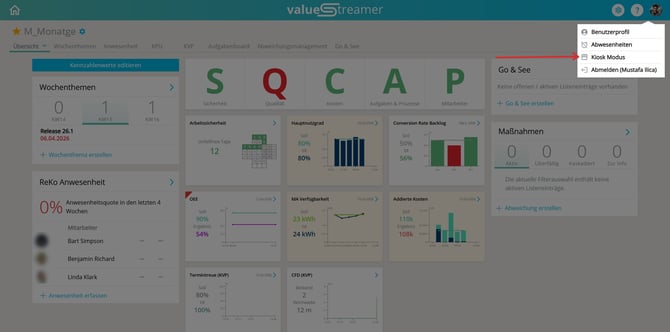
Features at a glance:
- ctivation via the user profile (avatar in the top right) within a team
- Confirmation dialog before activation
- Simplified header: navigation, settings, and profile are hidden
- Visible buttons in kiosk mode: “Refresh” and “Exit”
- Kiosk mode is tied to the current browser session and remains active even after a page reload
- Automatic activation via an inactivity timer is possible (configured by system admins)
- Exiting kiosk mode ends the browser session and loads the login screen
📸 Screenshot: Confirmation dialog: ‘Activate kiosk mode?’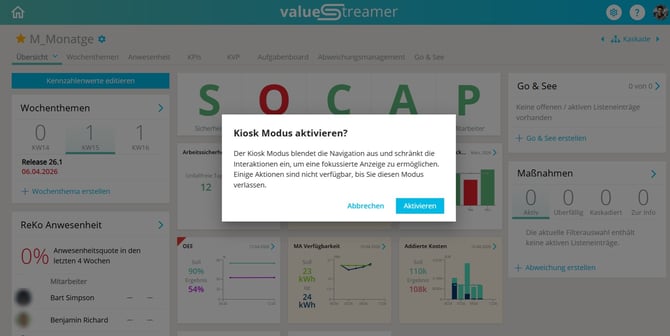
📸 Screenshot: Activated kiosk mode — team overview with a simplified header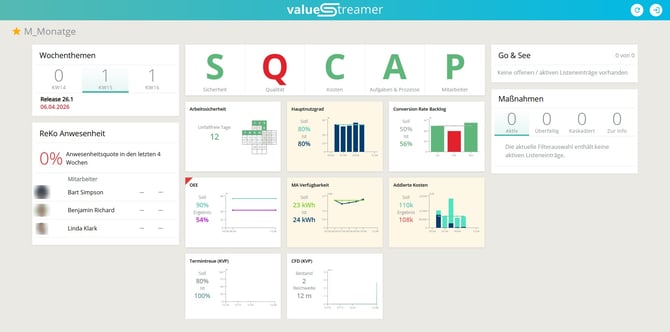
📸 Screenshot: Confirmation dialog: ‘Exit kiosk mode?’ — the session is ended and the login screen loads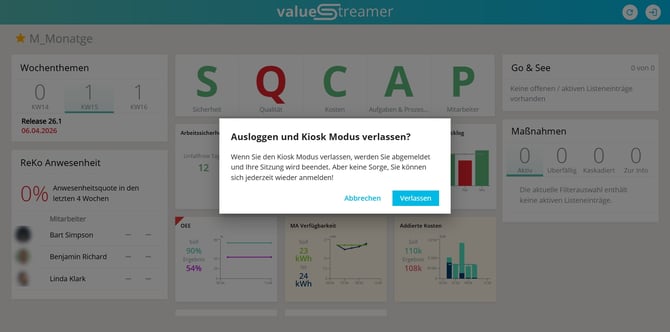
ℹ️ Note: Kiosk mode can only be activated within a team. The feature is not available on the personal home page or in system administration.
ℹ️ Note: Kiosk mode is an add-on and is not available to all customers by default. It is enabled by ValueStreamer via the backend.
⚠️ Important: While kiosk mode is active, all editing and navigation functions are disabled. It can only be exited via the “Exit” button, which also ends the current session.
✨ Tip: With the automatic inactivity timer, shopfloor boards switch to kiosk mode automatically after meetings — without any manual intervention.
👉 Learn more about this topic in the article: 🖥️ Kiosk-Modus – Fokussierte Shopfloor Anzeige aktivieren
🔗 Multiple links to key metrics from different teams
Previously, it was not possible to link content such as top topics, Go & See items, feedback, or deviations/actions from different teams to the same KPI. This led to disruptions in meetings, especially with aggregated KPIs, because users had to navigate to deeper hierarchy levels — sometimes without having the necessary permissions.
With version 26.1.0, links to a KPI can now be created across teams, each from the perspective of the currently selected team.
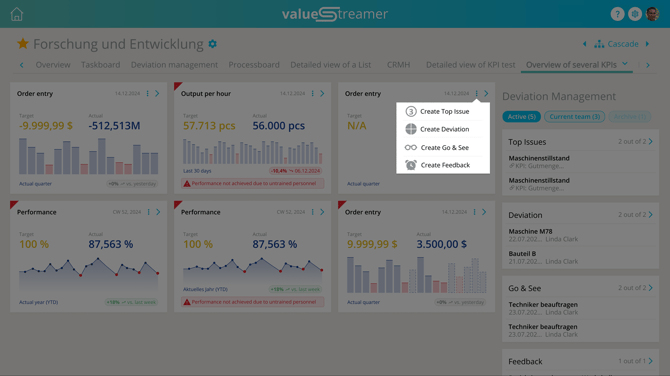
📸 Screenshot: Deviation management section with cross-team links
Features at a glance:
- inks such as top topics, deviations, actions, Go & See items, and feedback can now be created across teams for a KPI
- The “Deviation Management” section has been revised and now displays all relevant links in a clear overview
- Quick filters: “Active,” “Current Team” (default), “Archive”
- New links can now be added centrally via the KPI tile or the header of the KPI detail view
- Existing roles and permission concepts remain unchanged
- Links from directly subordinate teams, including private teams, continue to be displayed
📸 Screenshot: KPI detail view with the menu “Create Top Topic / Create Deviation / Create Go & See / Create Feedback”
ℹ️ Note: Existing permissions still apply. Users who are not members of a linked team can view content from that team, but cannot edit it.
✨ Tip: Use cross-team links to make aggregated KPIs in the cascade directly actionable during meetings — without media disruption and without handwritten notes.
👉 Learn more about this topic in the article: 🔗 Mehrfachverknüpfungen zu Kennzahlen aus unterschiedlichen Teams
🔗 Optimized integration of external content (iFrame)
The embedding of external content, such as Power BI or Excel, has been technically enhanced.
Previously, login pop-ups within iFrames could not be opened due to sandbox restrictions. With version 26.1.0, the iFrame sandbox settings can now be configured more precisely.
Features at a glance:
- Improved integration of Power BI and Excel
- Greater flexibility when embedding external applications
- Transparent handling of security-related settings
🗂️ More realistic T-card planning
The logic for planning daily T-cards has been adjusted.
When the “Without Saturday/Sunday” setting is enabled and a T-card is completed on Friday, the next due date is now automatically scheduled for Monday instead of Saturday.
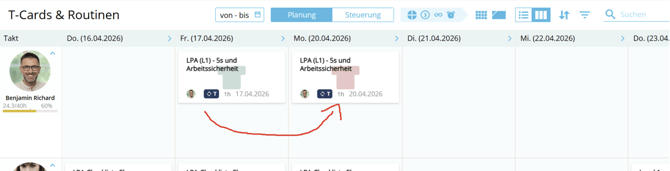
📸 Screenshot: Optimization of the T-card board
Features at a glance:
- More realistic day-to-day planning
- Avoidance of unnecessary weekend due dates
- More consistent user experience
🔍 Improved search on the home page
The search function on the home page has been enhanced. Instead of using a pure prefix search (term starts with …), it now uses a partial-word search, in line with the list views.
Features at a glance:
- aster team discovery
- Usable even without knowing the exact name
- Consistent search logic across the application
📱 Mobile Landingpage
Da die aktuelle Anwendung noch nicht vollständig für Smartphones optimiert ist, erhalten Nutzer auf kleineren Screens (z. B. Smartphones oder kleinen Browserfenstern) statt der Login-Maske eine klare Hinweisseite zur bevorstehenden mobilen App.
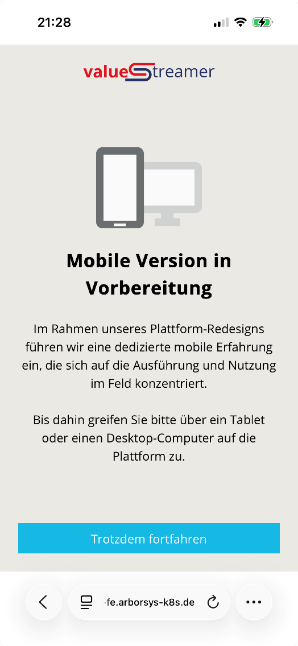
📸 Screenshot: Mobile landing page: ‘Mobile version coming soon’
Features at a glance:
- Clear user guidance on mobile devices
- Transparent expectation management regarding mobile usage
- Preparation for upcoming mobile features, including the audit app
ℹ️ Note: ValueStreamer can still be used without restriction on tablets and desktop computers. The mobile app is currently under development.
🐞 Bug Fixes
With every release, we continuously improve the user experience — often in ways that go unnoticed, but make a real difference in day-to-day work.
🗑️ Deprecation of Lists API v1 and Deviation API v2
🔭 Outlook: Planned changes in VS 26.1.1
With version 26.1.1, Lists API v1 and Deviation API v2 will be discontinued. From this release onward, only Lists API v2 and Deviation API v3 will remain supported.
⚠️ Important: Customers who manage lists via the API and are still using v1 must migrate their integration to v2 before this update.
Further information:
🧾 Listeneinträge per REST API verwalten
📚 API-Dokumentationen & YAML-Dateien zum Download